Standard Poster Sizes in Singapore: A0, A1, A2, A3 and A4 Explained

From event backdrops and shop windows to lecture-hall notices and lift-lobby announcements, a good poster does one job well: it gets noticed. But before you upload a single file, one decision shapes how your design lands on the wall — what size should it be? Getting poster sizes right is the difference between a display that commands a room and one that looks lost on it. This guide walks through the standard poster sizes in Singapore, from a wall-filling A0 down to a compact A4, so you can brief a print run with confidence. If you already know what you need, you can jump straight to poster printing in Singapore; if you are still deciding, read on.
How standard poster sizes actually work
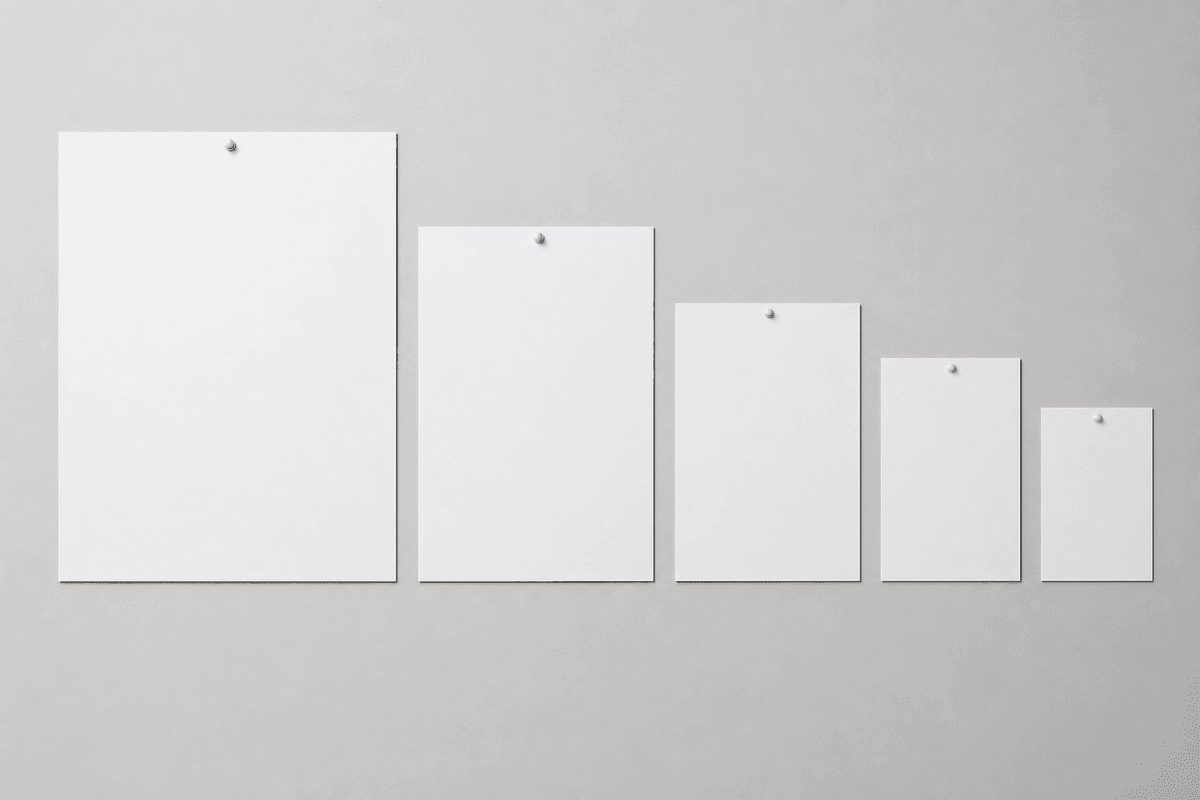
Almost every poster printed in Singapore follows the ISO 216 "A-series" — the same international paper standard behind the A4 sheet in your office printer. The clever part of the system is its proportions. Every size in the series shares the same aspect ratio, roughly 1:1.41 (the square root of two). Cut any A-size in half across its longer edge and you get exactly the next size down. That means an A2 is two A3 sheets, an A1 is two A2 sheets, and an A0 is two A1 sheets.
Two practical benefits follow from this. First, your artwork scales cleanly between sizes without awkward cropping — a layout designed for A3 will enlarge to A1 without changing shape or leaving unexpected gaps. Second, ordering becomes simple: once you understand the A-series, you can picture any poster size in your head instantly, and you never have to memorise a random list of unrelated dimensions.
The standard poster sizes, from A0 to A4
Here are the dimensions you will actually specify, listed from largest to smallest. All measurements are given as width by height in portrait orientation and in millimetres, which is the standard unit for print in Singapore.
- A0 — 841 × 1189 mm. The largest common poster size. A statement piece for exhibitions, product launches, conference stages and large shop displays, where the goal is to be read from across a room.
- A1 — 594 × 841 mm. A popular all-rounder for event signage, retail promotions and standing displays. Big enough to command attention, yet still practical to transport, roll and mount.
- A2 — 420 × 594 mm. A versatile mid-size for notice boards, café menus, classroom charts and window posters. For many businesses this is the sweet spot between visual impact and budget.
- A3 — 297 × 420 mm. Compact but confident. Ideal for in-store signage, corridor notices and desk-height displays where viewers are standing fairly close.
- A4 — 210 × 297 mm. The smallest size most people still call a poster — in practice a large flyer or handbill. Handy for counter cards, lift-lobby notices and anything meant to be read at arm's length.
As a quick reference: A3 is exactly double the area of A4, A2 is double A3, A1 is double A2, and A0 is double A1. If you have ever held an A4 sheet, you already have a feel for the whole family.
Portrait or landscape?
Every A-size can be printed either way. Portrait — taller than it is wide — is the default for most posters because it suits vertical wall space and reads naturally from top to bottom, which makes it a strong choice for event line-ups, product features and announcements with a clear headline. Landscape — wider than it is tall — works better when your hero image is horizontal, when you are filling a wide gap above a doorway or service counter, or when you want to lay several blocks of information side by side. If you flip orientation, the numbers simply swap: an A1 landscape poster measures 841 × 594 mm rather than 594 × 841 mm.
Matching poster size to your space
The most common sizing mistake is choosing a poster in isolation, without picturing where it will hang. A large A0 that looks dramatic in an exhibition hall can overwhelm a small retail wall, while an A4 that is perfect on a counter disappears entirely on a tall shopfront. Before you decide, measure the wall, window or stand where the poster will live, and leave a comfortable margin of empty space around it so the design has room to breathe.
As a rough starting point: A0 and A1 suit open, high-traffic areas such as event spaces, malls and building lobbies; A2 and A3 are well matched to notice boards, classrooms, cafés and in-store displays; and A4 belongs on counters, desks and inside frames at eye level. If you plan to place the poster inside an existing frame or stand, always confirm the frame's internal dimensions first, as the visible area is usually a little smaller than the frame's outer size.
Viewing distance: the rule of thumb that saves reprints
A poster is only as good as its readability from where people actually stand. The further away your audience will be, the larger both the poster and its text need to be. A headline that looks bold on your laptop can become unreadable from across a lobby, and a busy layout that works up close turns to visual noise at a distance.
A simple habit helps: identify the closest and furthest points from which people will realistically view the poster, then design for the furthest one. For posters seen mostly at arm's length, such as A4 and A3 counter pieces, you can include more detail and smaller type. For A1 and A0 posters seen from several metres away, lead with one strong image, a short headline and only the essential supporting text. When in doubt, prioritise fewer words at a larger size over more words that nobody can read.
Preparing your artwork for print
Once you have chosen a size, a few file-setup basics will keep your poster looking sharp:
- Set the document to the exact poster size. Build your file at the final dimensions — for example 420 × 594 mm for A2 — rather than designing small and scaling up at the end.
- Add bleed. Bleed is a small margin of extra background that extends beyond the trim edge, so that any colour or image meant to reach the edge still does after cutting. It prevents thin white slivers along the border.
- Keep important content away from the edges. Pull key text and logos inward from the trim line so nothing critical gets clipped during cutting.
- Supply print-ready, 300 DPI artwork. High-resolution files keep photos and fine text crisp at large sizes. Low-resolution images that look fine on screen can appear soft or pixelated once enlarged to poster scale.
- Embed or outline your fonts. This ensures your typefaces render exactly as designed, rather than being substituted for something else.
When your file is ready, you can send it straight through to poster printing in Singapore and pick the size that fits your space.
Frequently asked questions
What is the most popular poster size in Singapore?
There is no single answer, because it depends on the job. A1 and A2 are common go-to sizes for events and retail because they balance strong visual impact with easy handling, while A3 and A4 are popular for in-store and counter-level notices. Match the size to your space and viewing distance rather than defaulting to one option.
What is the difference between A1 and A0?
An A0 poster (841 × 1189 mm) is exactly twice the area of an A1 poster (594 × 841 mm). A0 is the largest common poster size and best for big, open spaces; A1 is a more manageable large format that still makes a strong impression.
Can I print a poster in a custom, non-standard size?
The A-series covers the vast majority of needs and keeps design and framing simple, which is why it is the standard. If your space calls for something unusual, the safest approach is to design at your exact required dimensions and confirm the details before printing.
Should I design in portrait or landscape?
Choose the orientation that suits your key visual and your wall space. Portrait suits vertical spaces and headline-led designs; landscape suits horizontal images and wide gaps. Either way, remember the width and height measurements swap when you rotate the poster.
Why are poster sizes given in millimetres and not pixels?
Print is a physical medium, so sizes are measured in millimetres or centimetres — for example, A2 is 420 × 594 mm. Pixels describe on-screen images and depend on resolution; for print, what matters is the finished physical size plus print-ready, 300 DPI artwork.
Understanding the A-series turns poster ordering from guesswork into a quick, confident decision. Measure your space, think about how far away people will stand, choose the size that fits, and prepare a clean print-ready file — and your message will land exactly as you intended.